Remove Marked Coil

Timing-10Th Generation 14NM CPU - Open Image In New Tab For Better Resolotion

Timing-10Th Generation 10 NM CPU - Open Image In New Tab For Better Resolotion.

Note: 14NM Is Different From 10NM
The fuse resistor refers to an appearance
similar to a resistor. Some products are marked with a color ring to
distinguish the size of the current, so they are named fuse resistors and PICO
fuses.
Below we introduce in detail the definition
and classification of fuse resistors, the functions of fuse resistors, and how
to judge the quality of fuse resistors.
Definition
Of Fuse Resistor:
The so-called fuse resistor means that the
resistor and the fuse are similar in material and structure, and the fuse
resistor has the functions of both. It can be used as a resistor in normal
times. Once the current is abnormal, it will play the role of a fuse to protect
it.
Classification
Of Fuse Resistors:
Metal film fuse resistors, wire wound resistors, cement
resistors. There are several types of power: 1/4W, 1/2W, 1W, and 2W. As
the power increases, the appearance size of the product will continue to
increase.
It can be divided according to size: 2*6
mm, 2.4*7mm, 3*9mm, 2.5*6mm, etc. The color of the product body is green
and yellow, as shown in the picture.
Among them, the appearance of 2*6 mm and
3*9mm fuse resistors is marked with a color ring to distinguish the size of the
current.
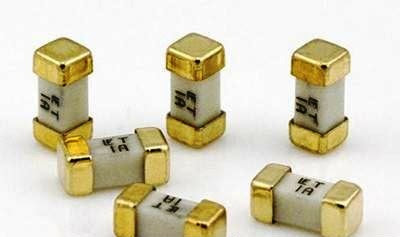


SMD FUSE
A fuse is a very thin
wire; the function of fuses is to stop higher than normal current from flowing
through an electronic circuit.
It is designed to
protect electronic components from being damaged, fuse come in different sizes
and shapes. A fuse is labeled as (F) in a motherboard.
SMD Fuse symbolized on
Motherboard & Schematic diagram with the letter F and sometimes symbolized
with two letters like PF, FP and next to it is a number
The Role
Of The Fuse Resistor:
The resistance of the fuse resistor is generally small, most
of which are less than 1 ohm. They often play the role of a sampling resistor
in the circuit. They also play a role when a surge occurs, or other large
currents are generated and the line needs to be protected. Fuse breaks the
circuit to provide protection.
How To Judge The Quality Of
The Fuse Resistance:
Use a Multimeter to set the fuse to the ohm
level, and use test leads to test both ends. If the resistance value is the
same as the nominal value, it is good. If it becomes larger or infinite, it is
bad. Damaged resistors will not increase their resistance.
If the fuse resistor is bad, follow the
replacement principle of the same power when replacing the fuse resistor.
SMD Fuse Testing Method
Touch the probes to
both end of the fuse. You can check the fuse while it still in Motherboard or
out of Motherboard.
A good fuse reading
should show continuity or read ZERO ohms.
A bad fuse is open
which will not show any reading on your meter. You may also set to the buzzer
range to test a fuse with digital meter.
If the fuse is ok, the
buzzer will sound and if the fuse is damage there will be no sound.
The red and black test probes can be either way when testing fuse
Laptop Model: Dell15-3520
Board Number: LA-L947P
Repair Process:
1. When the laptop
turned on, and
each voltage is measured. There is no CPU power supply. Check the drawing that PUZ101 power supply is normal, and
the open pin 51pin is low level.

1. Check the IMVP_VR_ON_EN signal to the fourth pin of UC8, and measure the high level of pin 1 and the low level of pin 2.

1. Check pin 2. IMVP_VR_EN is sent from the C2 pin of EC. It seems that the timing needs to be
checked.

1. The condition for IMVP_VR_ON_P to be
turned on is that ALL_SYS_PWRGD is high level and the measured low level
is.

ALL_SYS_PWRGD is sent by 1.2V_VTT_PWRGD. The measured 1.2V_VTT_PWRGD is low level.

1. 1.2V_VTT_PWRGD is sent out by the 10TH
pin of the memory power
supply chip PUM01. The 1.2V memory power supply and VTT Voltage must be
normal. The measured 1.2VP voltage
is normal and the VTT voltage is 0V. The start signal pins 8 and 7 are all at high level and pin 20 is not short-circuited to
ground.

1. After replacing the
memory power supply chip RT8207 , the computer started up
smoothly.

Happy Repairing!!
Practical
Use Of Oscilloscopes
1. Use Of
The Oscilloscope When Troubleshooting Does Not Trigger A Fault:
1. When troubleshooting does not trigger a fault, it is often
necessary to detect whether the 32.768KHZ crystal oscillator of the South
Bridge and Ehas started to oscillate. The normal waveform is as follows:

2. When maintenance does not trigger a fault, whether the EC can successfully read the contents of the BIOS and enter the working state is an important test point for us. The normal waveform is as follows:
BIOS first pin CS#.


The sixth pin of BIOS is S_CLK.

2. Use Of
Oscilloscope To Repair Switching Power Supply
1. When inspecting switching power supply, it is necessary to
determine whether the power chip is protective and has no output or is not
working and has no output due to its own reasons. The most effective method is
to measure whether the DH (Gate of the Upper Mosfet) has an instantaneous
voltage. The wave output is VIN+5V. The following figure shows the waveform
captured during normal operation.

The G pole of the lower Mosfet is DL, and the waveform power is
5V. The picture below shows the waveform captured instantly when there is
no protective output.

Note: Sometimes during actual maintenance, it is necessary to
remove the upper and lower MOS Mosfets and measure the waveform of the G pole
of the upper Mosfet. If this is the case, a 5V square wave output should be
measured instantly.
2. Connect it. When it is detected that the upper Mosfet G
voltage is not enough, you need to detect the BOOT bootstrap terminal of the
power chip. The waveform is a square wave from DH to VIN+5V.

3. Connect it. When DH can reach a normal waveform, you need to measure
the waveform of the LX node (front end of the coil power supply). Normally it
is a square wave = VIN.

4. Connect it. When LX can measure the
normal waveform, you need to measure the back end of the coil power supply,
which is the soft start process of the output voltage. Observe whether the
voltage is good during the startup process from 0V to the target value, and
whether there is under voltage. Or in the case of overvoltage protection, the
normal waveform is as follows:
VCCDDR soft start.

VCORE soft start.

Abnormal VCORE soft-start waveform.

5. Soft start comparison chart of 3 and 5V dual-channel capture system.

3. How To
Use The Oscilloscope During The Hard Start Process After Powering On
1. After powering on, check whether the main power supply of
the motherboard is normal. You can measure the front-end LX of their coil power
supply. Normally there will be a square wave.
VCCDDR node waveform.

VCORE node waveform.

You can also measure VOUT, which is the back end of the coil inductor or
the positive pole of the filter capacitor, to see if there is a smooth DC
current, as shown below:

2. When the power supply to the motherboard is normal, you need to check
whether the clock circuit on the motherboard is working normally according to
the timing. In the past ICH era, you could measure the 330 resistor next to the
clock chip. Normally, you can measure many different clock frequencies. It is a
sine wave. The picture below shows the 100M clock of the Northbridge.

In the I-series era, the clock chip was
generally integrated into the PCH, so you can generally test whether the 25M
clock next to the south bridge is oscillating to determine whether the
motherboard clock is normal. The figure below is the south bridge 25 waveform.

Of course, measuring 25M oscillation does
not mean that the clock module inside the Southbridge must be normal and can
output the various sets of clocks required by the motherboard. Therefore, you
can test the clock pins of EC or network cards and other equipment to make a
judgment. The picture below shows the 33M of EC. Clock frequency.

3. When the clock circuit is working
normally and the next sequence is pressed, we can judge whether the motherboard
reset is normal by testing the 22-pin PLTRST# of the WLAN for a high level of
3.3V. The following figure is the soft-start waveform of PLTRST# .

CPURST#
4. After PLTRST# is raised, according to the timing, the last signal to be measured during maintenance is CPUURST#, which traditionally marks the end of the timing and the completion of the hard start. (Some I series machines are VGA_RST#) The picture below is the CPUURST# soft start waveform.

4.
Application Of The Oscilloscope During The Soft Start Process:
ADS#
1. After knowing the principle, we can use the ADS# address
strobe signal (only available in the ICH era) during actual maintenance. When
the waveform in the figure below is captured, it means that the CPU has begun
to establish communication with the North Bridge. Generally, it can be confirmed
that the CPU starts working and the addressing instructions are sent to the
North Bridge.

PCI_FRAME#
2. Then, during actual maintenance, PCI_FRAME# can be
measured. If the following waveform appears, it can be considered that the
north and south bridges have begun to establish communication, and the north
bridge transmits the addressing instructions received from the CPU to the south
bridge. (PCH6 cancels the PCI bus).

LPC_BUS
3. Next, in actual maintenance, you can test the LPC bus
LAD0---LAD3 or LFRAME#. These five lines must be able to catch the pulse
waveform. If so, it can be considered that the south bridge and EC have begun
to establish communication. , Nanqiao passes the addressing instructions
through EC and captures the BIOS. Of course, this bus architecture
connection method is common in the ICH era. The BIOS is hung under the EC, and
the BIOS participates in the triggering.

SPI_BUS
4. Next, during actual maintenance, the SPI bus of the main
BIOS can be measured. Normally, several pulse waveforms can be measured. It can
be considered that the CPU has successfully captured the POST code of the BIOS,
and the soft start can be considered completed.
BIOS CS# chip select waveform.

SO waveform of BIOS pin 2.

5. Application
Of Oscilloscope In The Self-Test Process:
1. The next step is the self-test process. The CPU starts to
perform POST power-on self-test. First, it checks the integrity of itself and
the chipset. When both are good, the next step is to check PCI-E
first . Is the bus in good condition? Because the speed and frequency
here are very fast, generally the oscilloscope cannot capture the PCI-E
waveform. Therefore, in actual maintenance, it is generally judged by
measuring its impedance to ground with a multimeter. As long as there is no
open circuit or short circuit, it is generally considered OK.
SPD
2. The next step is to self-test the memory. Southbridge uses
SMB_BUS to read the SPD information of the memory, such as manufacturer, frequency,
capacity, etc. Therefore, in actual maintenance, we can test SMB_BUS to
determine whether Southbridge has started reading the memory. Normally
there will be a waveform as shown below.

ODT
3. The next step is the data transmission between the memory
and the memory controller, but before the data transmission, the memory
controller first verifies the memory through the ODT pin, and only starts
transmitting data after the verification is successful. By measuring it
during actual maintenance, it can be considered that the memory controller
starts to verify the memory. Normally there will be the following waveform.

4. Immediately afterwards, the memory
controller starts data transmission with the memory. We usually choose the
test point on each resistor on the memory, and also note the AD line. Normally,
pulses must be measured on multiple resistors to be considered as passing the
memory. As shown in the picture below, it can be considered that POST
successfully self-tested the memory.

After connecting, in addition to measuring
the AD line of the memory, if it is a third-generation memory, the RST# of the
memory can generally be measured and the memory can be judged. As shown
below, after passing through the memory, such a pull-down waveform will be
measured.

5. After passing the memory, we reach the
graphics card. We can test whether the AD line between the graphics card and
the graphics memory has the following waveform. If so, it is considered that
the basic working conditions of the graphics card have been met, and data
transmission with the graphics memory can be started.
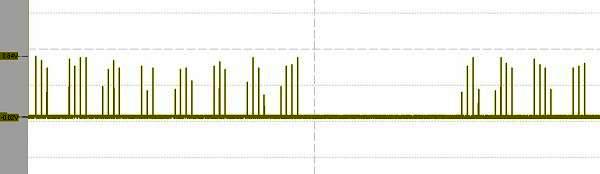
EDID
6. Following EDID, it is also a means for the graphics card
to capture screen information parameters through the system management bus. It
is similar to Southbridge capturing memory. The graphics card thus obtains some
basic parameters of the screen, such as maximum resolution, manufacturer, etc.
In actual maintenance, we usually test the EDID to see if
there is a correct waveform. If so, it can be considered that the graphics card
has started working. Of course, its working conditions are basically OK.

7. After the graphics card obtains the
screen information through EDID, it starts to send out the screen power on
signal LCD_EN and the backlight on signal BLON to light up the screen (Note:
According to the machine design, some machines send out LCD_EN first and then
EDID).
LVDS
8. After the screen receives power from the screen, the
circuit on the screen can start to work. Finally, the graphics card transmits
the image information to the screen through the screen cable through the LVDS
differential signal to finally form an image.

Note: LVDS is generally three sets of
differential red, green and blue + one set of differential CLK, which is very
important. Any abnormality in any one of them will cause various image-related
failures such as white screen, gray screen, and blurry screen. Normally we
can get the LVDS waveform as follows:
6.
Application Of Oscilloscope To Repair Power-Off Faults:
In laptop maintenance, power-off faults are often a headache
for maintenance personnel. Here we teach students how to quickly find the fault
point using the dual-channel comparison method of an oscilloscope for such
faults.
Oscilloscope settings:
(1) Select Normal as the trigger mode;
(2) Select Falling Edge as the edge type;
(3) The trigger level is half of the voltage value of the
measured point.
Below we give an example of a diagram of a fault we usually
encounter during maintenance, to briefly explain:
Example 1:
First, the blue line of channel 1 in the picture below is
VCCDDR, and the yellow line of channel 2 is PLTRST#.

It can be clearly seen from the above
figure, because they dropped almost at the same time, but the difference is
that PLTRST# dropped suddenly, while VCCDDR dropped continuously, so it can be
judged that VCCDDR was forced to drop due to the sudden loss of PLTRST# , this
also found the cause of the power failure, which was caused by PLTRST#.
Example 2:
The blue line in the picture below
is SLP_S5#, and the yellow line is PLTRST#.

Example Three:

System 3V overvoltage protection.

BOOT bootstrap happiness is too high.

The CPU power supply NEC large capacitor filter is poor.

SPD without memory.


The independent graphics power supply GPU _CORE voltage drops.


Common faults of electrolytic capacitors include reduction in capacitance, disappearance of capacitance, breakdown, short circuit a...


_EN.jpg)


